Hello Smart Hub readers!
Welcome back to AI Tools Smart Hub. It’s 2026, and life isn’t slowing down. We all have the same 24 hours in a day, but some people seem to get twice as much done. What’s their secret?
It’s usually not working harder; it’s working smarter with the right tools.
Artificial Intelligence has moved past the hype phase. Now, it’s just a practical part of getting things done efficiently. But with thousands of new apps launching every month, finding the right ones without spending a fortune is tough.
Don’t worry, I’ve done the heavy lifting for you. I have tested dozens of services to bring you the 10 best truly free (or generous freemium) AI tools that will boost your productivity this year.
Let’s dive in.
1. ChatGPT (by OpenAI)
What it is
ChatGPT remains the most versatile conversational AI chatbot for generating text, brainstorming ideas, and answering general questions.
Key Features (Free Version)
- Drafting Content: Easily write emails, blog outlines, or social media captions.
- Summarization: Paste long articles or reports to get a quick summary.
- Brainstorming Partner: Great for coming up with gift ideas, article topics, or business names.
Best For
Everyone. It is the essential starting point for beginners in AI.
Pro/Con
| Pro | Con |
| Extremely versatile for almost any text task. | Information can sometimes be inaccurate (hallucinations). |
2. Perplexity
What it is
Perplexity is an AI “answer engine” that combines a chatbot with real-time web search to give you factual answers with sources.
Key Features
- Cited Sources: Every answer includes small numbers linking back to the original websites it used.
- Real-Time Data: Unlike older AI models, it can access current news and information from the internet.
- Follow-Up Questions: You can dig deeper into a topic by asking related questions in the same thread.
Best For
Students, researchers, and anyone who needs quick, fact-checked answers instead of a list of Google links.
Pro/Con
| Pro | Con |
| Saves time by citing sources directly. | The free version isn’t as good at creative writing as ChatGPT. |
3. Notion
What it is
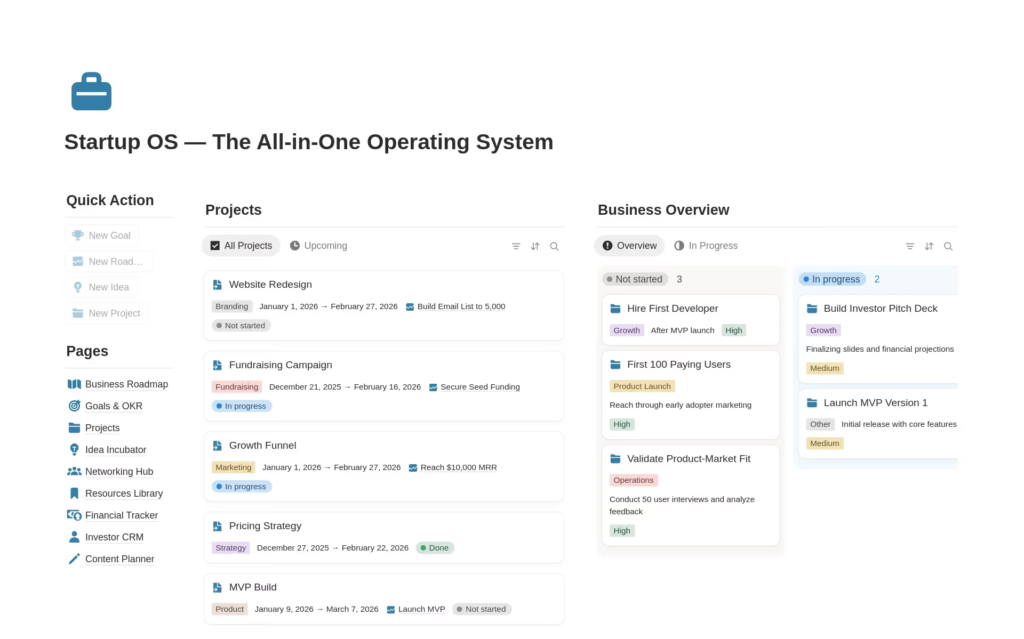
Notion is an all-in-one workspace for notes, tasks, and databases that increasingly integrates smart AI features to organize your life.
Key Features (Free Version)
- Flexible Organization: Build calendars, to-do lists, and document wikis in one place.
- Templates: Access thousands of free templates for project management or personal habits.
- Basic AI functionality: The free plan often includes limited access to Notion AI for summarizing notes or improving writing within the app.
Best For
Organizer enthusiasts, students, and freelancers juggling multiple projects.
Pro/Con
| Pro | Con |
| Incredible free tier for individuals. | Can feel overwhelming to set up initially. |
4. Canva
What it is
Canva is a user-friendly graphic design platform that uses AI to help non-designers create professional visuals quickly.
Key Features (Free Version)
- Magic Write: An AI text generator built directly into designs for quick captions or headlines.
- Text-to-Image: Generate basic unique images from text descriptions (limited daily uses on free plan).
- Massive Library: Access thousands of free templates, fonts, and stock photos.
Best For
Social media managers, small business owners, and anyone needing quick graphics.
Pro/Con
| Pro | Con |
| Very easy to use with great free assets. | The best AI tools like “Magic Resize” are locked behind the Pro paywall. |
5. Grammarly
What it is
Grammarly is an AI writing assistant that checks your spelling, grammar, and tone wherever you type online.
Key Features (Free Version)
- Real-time checking: It flags mistakes in your browser, email client, or documents as you type.
- Tone Detector: It tells you how your message might sound to readers (e.g., friendly, professional, aggressive).
- Basic Conciseness: It suggests removing unnecessary words to make your writing clearer.
Best For
Writers, professionals sending important emails, and non-native English speakers.
Pro/Con
| Pro | Con |
| Essential for catching embarrassing typos. | The free version only catches basic errors, not stylistic issues. |
6. Otter.ai
What it is
Otter allows you to record meetings or lectures and uses AI to generate a readable, searchable text transcript.
Key Features (Free Version)
- Automatic Transcription: Records audio and turns it into text in real-time.
- Speaker Identification: It tries to recognize different voices in the conversation.
- Searchable Notes: You can search the text later to find exactly what was said at a specific timestamp.
Best For
Students attending lectures and professionals in many meetings.
Pro/Con
| Pro | Con |
| A lifesaver for remembering verbal discussions. | The free plan has limits on how many minutes you can transcribe per month. |
7. Reclaim.ai
What it is
Reclaim is a smart calendar assistant that works with Google Calendar to automatically find the best time for your tasks and habits.
Key Features (Free Version)
- Time Blocking: You tell it what tasks you need to do, and it schedules them on your calendar around your meetings.
- Habit Scheduling: Set recurring routines (like “Lunch” or “Email check”) and it ensures they get booked.
- Smart Rescheduling: If a conflict comes up, it automatically moves your tasks to the next best available slot.
Best For
Busy professionals and freelancers struggling to manage their time.
Pro/Con
| Pro | Con |
| Helps protect time for focused work. | The free version currently only works well with Google Calendar. |
8. Gamma
What it is
Gamma is a new medium for presenting ideas, using AI to generate documents, slide decks, and websites from simple text prompts.
Key Features
- Prompt-to-Presentation: Type in a topic or paste notes, and Gamma builds a visual deck instantly.
- Flexible Cards: Instead of rigid slides, it uses flexible “cards” that are easier to read on screens.
- One-Click Restyling: Change the entire look and feel of your presentation instantly.
Best For
Startup founders, marketers, or anyone who needs to build visually appealing decks fast.
Pro/Con
| Pro | Con |
| Generous free tier that produces beautiful results quickly. | You still need to heavily edit the AI content for accuracy. |
9. Codeium
What it is
Codeium is a free AI-powered coding toolkit and extension that suggests code as you type, similar to GitHub Copilot.
Key Features
- Autocomplete: It suggests whole lines or functions of code based on context.
- Chat: A built-in chat window in your editor to ask coding questions or explain errors.
- Language Support: It supports over 70+ popular programming languages like Python, JavaScript, and HTML.
Best For
Beginner coders learning new languages and developers looking to speed up repetitive tasks.
Pro/Con
| Pro | Con |
| Completely free for individuals with great performance. | Beginners must be careful not to rely on it blindly without understanding the code. |
10. Adobe Firefly (Web App)
What it is
Adobe Firefly is a creative generative AI engine that allows you to create high-quality images and text effects from a simple browser interface.
Key Features (Free Version)
- Text to Image: Generate unique images in various artistic styles using descriptive prompts.
- Generative Fill: Remove objects from photos or add new ones just by using a brush and text.
- Text Effects: Apply creative textures and styles to words.
Best For
Creative professionals, marketers, or anyone needing unique images for presentations or social media.
Pro/Con
| Pro | Con |
| High-quality, commercially safe images. | The free plan uses a “credits” system that refreshes monthly. |
Conclusion
The goal of using AI tools in 2026 isn’t to replace human creativity; it’s to remove the tedious parts of your day so you have more time to be creative.
Don’t try to adopt all ten of these at once. Pick the one tool that solves your biggest current headache—whether that’s organizing notes, writing emails, or managing your calendar—and give the free version a try this week.
I’d love to hear from you in the comments: What is the one productivity problem you wish AI could solve for you right now?